Chapter 7 Checking models
In this chapter you will read a diagnostic of tok check and tell its layer, severity and code · repair a model with many errors in the right order · get diagnostics in Polish and as JSON for programs · restrict a model to a level of the language and test it against the conformance classes of BPMN 2.0.2 · keep models in the canonical form with tok fmt · know what a clean check proves about a model and what it does not
Writing a model in tok is a short loop: write a few lines, run tok check, read the diagnostics, correct, run it again. The checker is fast enough to run after every change, and the editors of Chapter 12 run it while you type. This chapter explains what it checks, how to read what it reports, and how far its verdict goes.
7.1 What tok check does
tok check FILE reads the document, checks it, and prints one line per problem, followed by a summary:
tok check 07-registry-error.tok
07-registry-error.tok:24: error R001: identifier 'unit' is already used on line 9
07-registry-error.tok: 1 error(s), 0 warning(s), 0 note(s)
Every line has the same parts:
| Part | Example | Meaning |
|---|---|---|
| file and line | 07-registry-error.tok:24 |
where to look; editors and terminals make this a link to the line |
| severity | error |
how serious the problem is |
| code | R001 |
a stable identifier of the kind of problem; the same problem always has the same code, in every language of the messages and in every release 1.x |
| message | identifier 'unit' is already used on line 9 |
what is wrong, with the identifiers concerned |
The exit code of tok check is 1 when the document has errors and 0 otherwise, so scripts and continuous integration can use it directly. Appendix D lists every code with its message.
The other commands check the document too. tok fmt, tok bpmn, tok svg and tok export refuse to work on a document with errors: they print the same diagnostics and exit with code 1. Warnings and notes do not stop them.
7.1.1 Severities
| Severity | Meaning | What you do |
|---|---|---|
| error | the document breaks a rule of the language or of BPMN 2.0.2; no valid BPMN file can be made from it | correct it, always |
| warning | the document is valid, but it very probably contains a mistake: an unreachable task, a branch without a condition, an escalation nobody catches | correct it, or keep it deliberately and be able to say why |
| note | a convention of good style: a gateway whose name is not a question, a task without a name | consider it |
A model is finished when it has no errors and every warning that remains has a reason you can state.
7.2 Layers and codes
The first letter of a code tells which layer of the checker reported it:
| Letter | Layer | Examples |
|---|---|---|
T |
tokens and lines | a tab in the indentation (T002), an unclosed string (T001) |
P |
statements | an unknown keyword (P001), a malformed attribute (P007), a malformed row of a decision table (P009) |
R |
references and structure of the document | an identifier used twice (R001), a reference to an unknown element (R002), a message flow inside one pool (R022) |
D |
decision tables and relations | a rule with the wrong number of cells (D002), rules that overlap under the hit policy unique (D010) |
F |
FEEL expressions | a syntax error (F002) |
M |
forms | an unknown field type (M001) |
S |
simulation parameters | an invalid distribution (S001) |
C |
the executable profile for Camunda 8 | a script task without an expression (C040), an element Camunda does not execute (C100–C132) |
E, W, L |
the rules of BPMN 2.0.2: errors, warnings and style notes | a message flow to a gateway (E009), a join of another type than its split (W051), a splitting gateway without a question (L020) |
The layers T to S work on the text: their diagnostics point to the line where the problem is written. The C layer applies only to documents marked executable (Chapter 10). The last layer works on the model itself: tok exports the document to BPMN 2.0 in memory and checks the result against the rules of the specification. Its diagnostics name the element or flow concerned in parentheses, with the identifier tok derived for it, such as f-urgent-file for the flow from urgent to file.
7.2.1 The order of the layers and cascades
The layers run in order. If the text cannot be read, or an identifier is used twice, there is no point in checking references: every reference to the duplicated identifier would be ambiguous. tok then reports only the first problems. Likewise, the BPMN rules are checked only when the tok layers report no error, because the model they check is the export of the document.
As a result, fixing one error can reveal others. The following model of registering incoming letters at a university contains mistakes on every layer.
tok 1.0 "Registering incoming letters"

pool university "University"
  lane registry "Registry office"
    start received "Letter received" message="Letter"
    user register "Register the letter" form=f-register
    rule assign "Assign the responsible unit" decision=unit
    xor urgent "Urgency"
  lane unit "Responsible unit"
    user file "File the letter for later"
    user handle "Handle the case" priority-level=high
    boundary deadline "14 days passed" timer=P14D
    user reply "Prepare the reply"
    end done "Case closed"
pool sender "Sender"

flow received -> register -> assign -> urgent
flow urgent -> handle "urgent" when="urgency = = \"high\""
flow urgent -> fiel
flow file -> handle -> reply -> done
flow deadline -> reply
message done -> register "Reply"

decision unit "Responsible unit" requires="kind" hit=unique
  | kind: string  || unit: string      |
  | "complaint"   || "Rector's office" |
  | "application" || "Student affairs" |

inputdata kind "Kind of letter" type=string
Download the model with errors (.tok)
The first run reports one error, shown above: the decision table and the lane are both called unit. Identifiers are unique in the whole document, not only among elements of one kind. After renaming the decision to responsible-unit (on line 24 and in decision= on line 7), the checker gets further and reports much more:
tok check 07-registry-error.tok
07-registry-error.tok:6: error R002: unknown form 'f-register'
07-registry-error.tok:11: warning R010: unknown attribute 'priority-level' on user
07-registry-error.tok:12: error R032: boundary event 'deadline' needs on=ACTIVITY
07-registry-error.tok:18: error F002: FEEL syntax error: unexpected '='
07-registry-error.tok:19: error R002: unknown flow node 'fiel'
07-registry-error.tok:22: error R022: message flow done -> register must connect two different pools
07-registry-error.tok: 5 error(s), 1 warning(s), 0 note(s)
These are independent mistakes of the text: a form that does not exist (forms are described in Chapter 10; here the attribute is simply removed), an attribute tok does not know, a boundary event without its activity, a doubled = in a condition, a typing error in an identifier and a message flow between two elements of the same pool. After correcting all of them, the document reaches the BPMN rules for the first time:
tok check 07-registry-error.tok
07-registry-error.tok:8: note L020: name of a splitting gateway is not a question (urgent)
07-registry-error.tok:19: warning W021: branch of an XOR/OR split without label, condition or default status (f-urgent-file)
07-registry-error.tok:22: error E009: message flow to a gateway, data or a non-message event (m-done-sender)
07-registry-error.tok: 1 error(s), 1 warning(s), 1 note(s)
The message flow now connects the two pools, but it leaves an end event that sends nothing: a message flow belongs to a message event or a task, so the end event needs message="Reply". The gateway “Urgency” is not a question, and one of its branches has neither a label nor a condition. The corrected model:
tok 1.0 "Registering incoming letters"

pool university "University"
  lane registry "Registry office"
    start received "Letter received" message="Letter"
    user register "Register the letter"
    rule assign "Assign the responsible unit" decision=responsible-unit
    xor urgent "Is the letter urgent?"
  lane unit "Responsible unit"
    user file "File the letter for later"
    user handle "Handle the case"
    boundary deadline "14 days passed" on=handle timer=P14D
    user reply "Prepare the reply"
    end done "Reply sent" message="Reply"

pool sender "Sender"

flow received -> register -> assign -> urgent
flow urgent -> handle "yes" when="urgency = \"high\""
flow urgent -> file "no" default
flow file -> handle -> reply -> done
flow deadline -> reply

message sender -> received "Letter"
message done -> sender "Reply"

inputdata kind "Kind of letter" type=string

decision responsible-unit "Responsible unit" requires="kind" hit=unique
  | kind: string  || unit: string      |
  | "complaint"   || "Rector's office" |
  | "application" || "Student affairs" |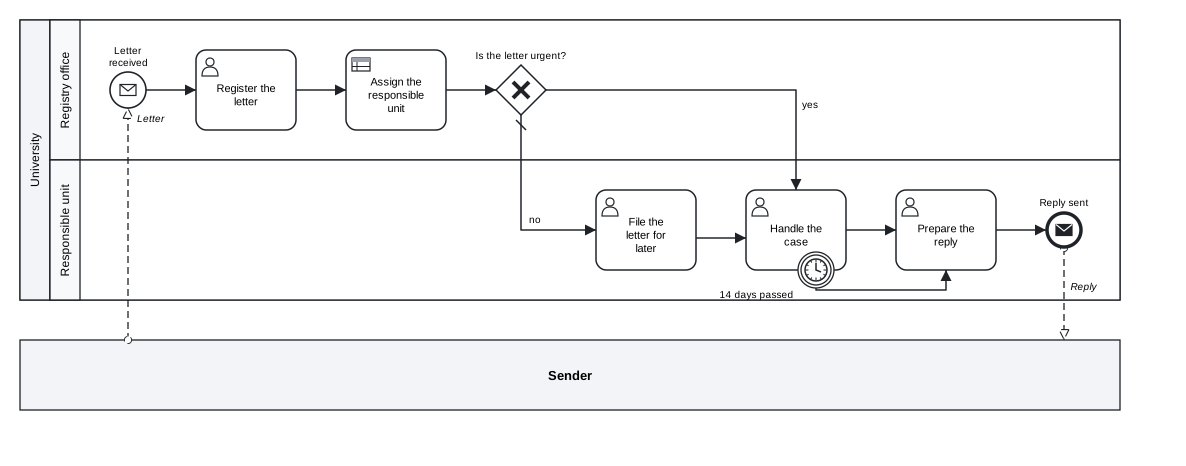
Figure 7.1: The registry model after all corrections.
Download the model (.tok) Download the BPMN export (.bpmn)
The cascade suggests a way of working:
- Start with the first error, and with the lowest layer.
TandPbeforeR,Rbefore the rest. - Run
tok checkagain after each correction. The list can change more than you expect, in both directions. - Errors first, then warnings, then notes.
- Read the message, not only the code. It names the element and often the correction:
needs on=ACTIVITY. - Do not delete an element only to silence a message. If the step exists in the real process, correct the way it is written.
7.2.2 Messages in Polish
--lang pl prints the messages in Polish; the environment variable TOK_LANG=pl does the same for every command. The codes do not change:
tok check 07-registry-error.tok --lang pl
07-registry-error.tok:24: błąd R001: identyfikator „unit” jest już użyty w wierszu 9
07-registry-error.tok: błędy 1, ostrzeżenia 0, uwagi 0
7.2.3 Diagnostics for programs
--json prints the diagnostics as JSON, for editors, scripts and AI agents:
tok check 07-registry-error.tok --json
{
  "file": "07-registry-error.tok",
  "errors": 1,
  "bpmn_class": "full",
  "diagnostics": [
    {
      "code": "R001",
      "severity": "error",
      "line": 24,
      "id": "unit",
      "message": "identifier 'unit' is already used on line 9"
    }
  ]
}
Each diagnostic has its code, severity (error, warning or note), line, the identifier id of the element concerned and the message. bpmn_class is the smallest conformance class of BPMN 2.0.2 the document fits (see below). A program does not have to parse the text of the messages: the code and the identifier say what is wrong and where. This is the form the agents of Chapter 14 work with. tok fmt, tok bpmn, tok svg and tok export also accept --json; for a document with errors they print an object with the file, the number of errors and the diagnostics instead of the text report.
7.3 The BPMN rules
The E, W and L codes come from the BPMN 2.0.2 specification. Every rule the checker enforces is tied to a clause of the specification; Appendix E gives the clauses. Some rules are checked earlier, in the text, where tok can point to the exact line: a message flow inside one pool is R022 rather than E008, a duplicate identifier R001 rather than E003.
| Area | What is checked | Codes |
|---|---|---|
| identifiers and references | identifiers are unique, ASCII and refer to existing elements of the right kind | R001–R004, E003, E004, E018 |
| sequence flows | they connect flow nodes of one process or sub-process; no flow into a start event or out of an end event; a default flow has no condition; a parallel gateway has no conditions; no flow written twice or from an element back to itself; a task or an event splits only through conditions or a gateway | R021, E005, E006, E011, E015, E017, W023, W043 |
| message flows | they connect two different pools, and end at a message event, a task, a sub-process or a pool | R022, E007–E009, W054 |
| events | each trigger only in the positions BPMN allows; boundary events attached to activities; error boundary events interrupting; event sub-processes without sequence flows; an event with several triggers is reported, since the bpmn.io linters reject it | E010, E012, E013, R032, R060, R062, W047 |
| activities and handlers | compensation handlers without sequence flows; ad-hoc sub-processes without start and end events, every other sub-process with its own; loop attributes only on loops | R050, R051, E014, R061, R063, R065, W045, W046 |
| gateways | an event-based gateway followed only by catching events or receive tasks; a split joined by a gateway of the same type; an inclusive split with a default; next to a default flow, every other branch has a condition | E016, W016, W020, W021, W022, W050, W051 |
| reachability | every process has a start and an end; every element can be reached from a start and leads to an end | W040–W042 |
| lanes | a node in at most one lane; in a pool with lanes, every node in a lane | E030, R030, W030, W031 |
| escalations and errors | what a boundary event of a sub-process catches is thrown inside it; a thrown escalation is caught somewhere | W052, W053 |
| data | associations connect data with activities or events; a state transition changes the state | R003, R064 |
| style | splitting gateways ask a question; a gateway either splits or joins; tasks have names | L020, L021, L030 |
The style notes L are conventions of good modelling, not rules of BPMN. A model with notes is valid BPMN; the notes help the reader.
7.3.1 BPMN files from other tools
The same rules check a BPMN 2.0 XML file drawn in Camunda Modeler, bpmn.io or any other tool, or written by an agent: give tok check the .bpmn file. Each finding names the element and the line of the file where it is defined.
tok check order.bpmn                                  # the BPMN rules
tok check order.bpmn --steps --steps-from process.md  # and the step numbers of a description
tok check order.bpmn --camunda                        # and the Camunda 8 profile of executable models
tok bpmn order.bpmn                                   # a fresh diagram layout, written into the file
tok svg order.bpmn                                    # the picture of its diagram
--steps asks for element names that start with the step number of a process description (12. Request for quotation); --steps-from reads the steps from the table of the description and reports those without an element. The codes of BPMN files are in Appendix D. An agent that writes BPMN XML instead of tok uses these commands through the skill bpmn-modelling (Chapter 14).
7.4 Levels of the language
--level restricts the elements tok check accepts to a level of the language. Chapter 3 introduced the three levels: basic (plain events, the core tasks and gateways, pools, lanes, data, notes), analytic (all of BPMN apart from the executable layer, forms, decisions and the advanced elements of languages 0.5 and 0.6), and full, the default. Each element beyond the level is the error R040:
tok check 07-registry.tok --level analytic
07-registry.tok:7: error R040: 'rule' is not available at level analytic
07-registry.tok:27: error R040: 'inputdata' is not available at level analytic
07-registry.tok: 2 error(s), 0 warning(s), 0 note(s)
tok check 05-book-pickup.tok --level basic
05-book-pickup.tok:7: error R040: 'boundary' is not available at level basic
05-book-pickup.tok:14: error R040: 'boundary' is not available at level basic
05-book-pickup.tok:15: error R040: 'boundary' is not available at level basic
05-book-pickup.tok: 3 error(s), 0 warning(s), 0 note(s)The registry model needs full because it contains a decision (the elements of a decision model are reported once, at the first of them); the book pick-up of Chapter 5 passes at the level analytic but not basic. Levels are an agreement about the readers of a model: a team can require that models for management stay at the level basic, and a course can introduce the language level by level. They are also a guard for an AI agent that should not use constructs beyond the task.
7.5 BPMN conformance classes
The BPMN 2.0.2 specification (clause 2) defines its own sub-classes of process modelling. They say which elements a tool must support to claim conformance, and therefore which elements a model may use to be readable in tools of that class:
| Class | Contains |
|---|---|
descriptive |
the visible elements of high-level modelling: tasks, sub-processes, call activities, exclusive and parallel gateways, none and message start and end events, timer start events, terminate end events, data objects and stores, pools and lanes, annotations, groups |
analytic |
descriptive and about half of the rest: conditions and default flows, intermediate events with message, timer, signal, conditional, escalation and link triggers, boundary events with message, timer, signal, conditional and error triggers, inclusive and event-based gateways, send and receive tasks, loops and multi-instance |
common-executable |
what an executable process needs: data inputs and outputs, item definitions, operations, but no pools, lanes or message flows, so it is not a superset of the other two |
full |
the whole modelling language, including transactions, compensation, script, business rule and manual tasks, event sub-processes, conversations and choreographies |
tok check --class CLASS reports every element outside the chosen class as the error R075, naming the BPMN element and the first class that contains it:
tok check 05-book-pickup.tok --class descriptive
05-book-pickup.tok:7: error R075: 'save-failed' (boundary error event) is outside the BPMN conformance class descriptive; it belongs to the class analytic
05-book-pickup.tok:14: error R075: 'three-days' (non-interrupting boundary timer event) is outside the BPMN conformance class descriptive; it belongs to the class analytic
05-book-pickup.tok:15: error R075: 'seven-days' (boundary timer event) is outside the BPMN conformance class descriptive; it belongs to the class analytic
05-book-pickup.tok: 3 error(s), 0 warning(s), 0 note(s)
tok check --json always reports the smallest class the document fits as "bpmn_class". For the models of the previous chapters:
| Model | bpmn_class |
Why |
|---|---|---|
05-book-pickup |
analytic |
boundary events |
07-unformatted |
analytic |
a non-interrupting boundary timer |
05-trip-booking |
full |
a transaction |
06-purchase-proposal |
full |
states of data objects |
08-document-delivery |
full |
a manual task |
The last two rows are worth noticing. BPMN puts data states and manual tasks outside its sub-classes, so a model that uses them is in the full class, even though both are simple to draw and to read. --class analytic tells you exactly which elements are responsible:
tok check 06-purchase-proposal.tok --class analytic
06-purchase-proposal.tok:14: error R075: 'proposal' (dataState) is outside the BPMN conformance class analytic; it belongs to the class full
06-purchase-proposal.tok:15: error R075: 'proposal-checked' (dataState) is outside the BPMN conformance class analytic; it belongs to the class full
06-purchase-proposal.tok:16: error R075: 'order-lines' (dataObject isCollection, itemSubjectRef) is outside the BPMN conformance class analytic; it belongs to the class common-executable
06-purchase-proposal.tok: 3 error(s), 0 warning(s), 0 note(s)
Levels and classes answer different questions. A level is an agreement about the language you write in: what a reader of the model is expected to understand. A class is a property of the BPMN file: which tools are guaranteed to read it. Use --class when a model has to travel to a tool that supports only part of BPMN, or when a call for tenders or a standard requires a conformance class. Appendix E lists the class of every construct of tok.
7.6 The canonical form
A valid model can be written in many ways: with different indentation and spacing, attributes in any order, flows as separate lines or as chains, flows next to the nodes or at the end. tok fmt prints every valid document in exactly one way, its canonical form:
- the header;
- item definitions and global tasks, then interfaces;
- flow nodes in the order of declaration, then pools with their lanes and nodes; data at the end of the block it was declared in;
- sequence flows in the order of declaration, joined into chains where a chain is unambiguous;
- message flows; correlation keys;
readsandwrites; notes and groups; decisions; forms; simulation statements; - two spaces of indentation, one space between tokens, labels always quoted, attributes in a fixed order, a blank line between sections.
Comments are kept. A comment line belongs to the statement after it and moves with it; a comment at the end of a line stays at the end of that statement’s line.
The following model is valid but written carelessly: flows next to the nodes, extra spaces, attributes in another order.
tok 1.0   "Renewing a loan"
# the reader asks online
start   asked "Renewal requested"
flow asked -> check
user check "Check reservations"
xor reserved "Is the book reserved by someone else?"
flow check -> reserved
flow reserved -> refuse "yes"
flow reserved -> renew   "no"
user renew "Extend the loan"    # by 30 days
user refuse "Refuse the renewal"
end renewed "Loan extended"
end refused "Renewal refused"
flow renew -> renewed
flow refuse -> refused
boundary late  "Two days passed" timer=P2D  noninterrupting on=check
flow late -> remind
service remind "Remind the circulation desk"
end reminded "Desk reminded"
flow remind -> remindedtok fmt FILE prints the canonical form without changing the file:
tok fmt 07-unformatted.tok
tok 1.0 "Renewing a loan"

# the reader asks online
start asked "Renewal requested"
user check "Check reservations"
xor reserved "Is the book reserved by someone else?"
user renew "Extend the loan"  # by 30 days
user refuse "Refuse the renewal"
end renewed "Loan extended"
end refused "Renewal refused"
boundary late "Two days passed" noninterrupting on=check timer=P2D
service remind "Remind the circulation desk"
end reminded "Desk reminded"

flow asked -> check -> reserved
flow reserved -> refuse "yes"
flow reserved -> renew "no"
flow renew -> renewed
flow refuse -> refused
flow late -> remind -> reminded| Option | Effect |
|---|---|
| none | prints the canonical form to the standard output |
-w, --write |
rewrites the file in its canonical form |
--check |
changes nothing; reports whether the file is already canonical (exit code 0) or not (exit code 1) |
tok fmt --check 07-unformatted.tok
07-unformatted.tok: not in canonical form
The canonical form is a matter of order, not of correctness: the careless model and its canonical form are the same model and give the same BPMN file. It matters in practice because two canonical files differ only where their content differs. A change of one condition is then a change of one line in version control, and the review of a change does not drown in reformatting. tok fmt is idempotent (formatting a formatted file changes nothing), it never changes the version in the header, and it removes the deprecation warning R090 by keeping only the last of a repeated attribute. Run tok fmt -w before you commit a model or hand it over, and tok fmt --check in continuous integration (Chapter 15).
7.7 Typical errors and their corrections
| Code | Typical cause | Correction |
|---|---|---|
T002 |
a tab in the indentation, often from copying text | indent with spaces; editors can convert tabs |
T003 |
a line indented deeper or shallower than any open block | align it with the block it belongs to |
P001 |
a misspelt keyword (usr, gateway) |
use a keyword of the language; Appendix B lists them |
P007 |
a label after the attributes, or a missing quote | write KIND ID "Label" attributes |
R001 |
the same identifier for two elements, often a lane and a task, or a decision and a variable | rename one of them and the references to it |
R002 |
a typing error in a reference | correct the identifier; the message quotes it |
R010 |
an attribute tok does not know | check the spelling; it may belong to another tool |
R020 |
a chain of flows with a label or a condition | split the chain: one flow per line where a flow has a label |
R021 |
a sequence flow into or out of a sub-process block | connect to the sub-process itself, or use events |
R022 |
a message flow inside one pool | use a sequence flow between lanes |
R030, R031 |
a node outside every lane of a pool, or outside every pool | move it into a lane or a pool |
R032 |
a boundary event without on= |
add the activity it is attached to |
F002 |
a FEEL syntax error, often = =, a missing quote or an unclosed parenthesis |
correct the expression; remember that tok writes FEEL without a leading = |
E009 |
a message flow to a gateway or from a plain event | connect it to a task or give the event a message trigger |
E010 |
a trigger in a position BPMN does not allow, or an intermediate catch event without a trigger | see the table of triggers in Chapter 5 |
E015 |
when= and default on the same flow |
a default flow has no condition |
W021 |
a branch of a split without label or condition | label every branch with the answer to the gateway’s question |
W022 |
a branch without a condition next to a default flow | give every other branch its condition (when="…", or when="" until it is known) |
W023, W043 |
a flow written twice, or a flow from an element back to itself | delete the copy; repeat an activity with loop or with a gateway |
W044 |
a task or an event with several outgoing flows and no gateway: all of them are taken | split with an and gateway, or give the flows conditions behind an xor |
W045, W046 |
a sub-process without its own start or end event | give the block of the sub its start and end |
W041, W042 |
an element that cannot be reached, or a path that does not end | add the missing flow or end event |
W051 |
a parallel split joined by an exclusive gateway, or the reverse | join with the same type of gateway |
7.8 What a clean check means
A clean check, 0 error(s), 0 warning(s), 0 note(s), means that the document is a valid tok document, that its BPMN export follows the rules of BPMN 2.0.2 that tok enforces, and that it avoids the common modelling mistakes that the warnings detect. It also means that every BPMN tool will open the exported file, and that its diagram will be drawn.
It does not mean that the model is right about the process. The checker knows the rules of the notation, not the work of your registry office. Consider the book pick-up of Chapter 5. If the seven-day deadline is written with one more word,
boundary seven-days "7 days passed" noninterrupting on=pickup timer=P7Dthe model is still valid, and tok check still reports no errors, no warnings and no notes. But it now says that the library sends the book back to the lending library while the reader can still pick it up. Only someone who knows the process can see that this is wrong.
The same holds for every other choice the notation leaves to you: whether a step is a user task or a manual task, whether a message goes to the right participant, whether a condition uses the right variable, whether the decision table gives the answers the regulation requires, whether a step is missing altogether. To check a model against the real process:
- Read it with the people who do the work. Walk through the diagram case by case: the normal case, the exceptions, the case that happens once a year.
- Keep a mapping between the source of the model (an interview, a regulation, a table of steps) and its elements, and check that every row of the source is in the model and every element has a source.
- Test the decisions with
tok evaland real cases (Chapter 9). - Simulate the process (Chapter 11): a simulation shows where cases queue, which paths are never taken and which end events are never reached.
A clean check is the beginning of a review, not its end.
Exercises
Exercise 7.1
- The registry, step by step. Download
07-registry-error.tokand repair it yourself, runningtok checkafter every change. Write down how many diagnostics each run reports and from which layer. Compare your result with07-registry.tok. Download the model with errors (.tok) - A study room. The model
07-study-room-error.tokhas mistakes on the layersT,P,RandE, and style problems. Correct it until the check is clean, and explain for each code what was wrong. Download the model with errors (.tok) - JSON for a script. Run
tok check --jsonon a model with errors and write a short script (in any language) that prints only the codes and lines of the errors, sorted by line. - Levels and classes. Check three models of the previous chapters with
--level basic,--level analytic,--class descriptiveand--class analytic, and record thebpmn_classof each. For one model in the classfull, write a version in the classanalyticand say what information the change removes. - Canonical form. Rewrite one of your models by hand in a careless way (different spacing, attributes in another order, flows next to the nodes) and check that
tok fmt --checkrejects it. Format it withtok fmt -wand compare the result with the original usingdiffor your version control. - Valid but wrong. Take a clean model of your own and make three changes that keep it valid but make it wrong about the process (for example, a timer that should interrupt but does not, a message sent to the wrong pool, two branch labels swapped). Give the model to a colleague and ask them to find the changes by reading the diagram.